
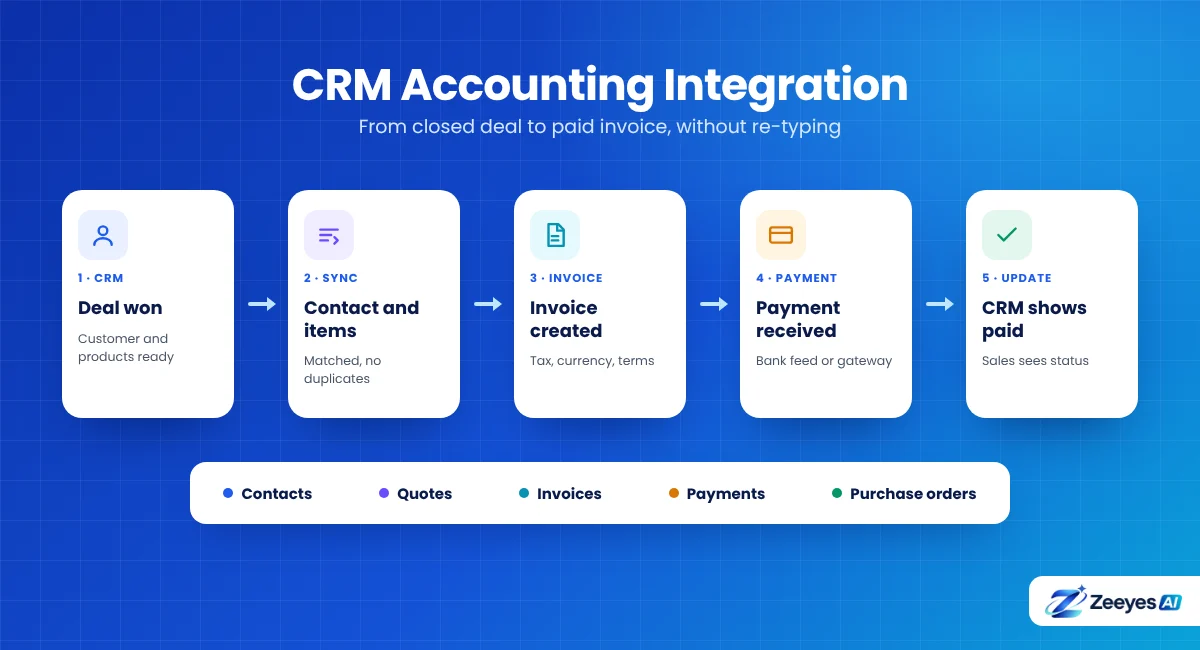
Short answer: CRM accounting integration connects your CRM with your accounting software so customers, products, quotes, invoices and payments move between them automatically. When a deal is won, the invoice is created in the accounting app, and when the customer pays, the CRM shows it as paid. Sales and finance work from the same numbers without re-typing anything.
Key takeaways
- Decide which system owns each type of record before you connect anything.
- Sync only what each team needs; more fields mean more things that can go wrong.
- Most sync errors come from tax codes, currencies and duplicate contacts.
- Creating invoices as drafts first gives finance a safe review step.
What is CRM accounting integration?
Your CRM is where sales happen: leads, deals, quotes and customer conversations. Your accounting software is where money is recorded: invoices, bills, payments and tax. Without a connection, someone copies data from one to the other, usually at the end of a busy day.
CRM accounting integration replaces that copying with an automatic sync. The two systems share customer details, products, quotes, invoices and payment status, each keeping the part it does best. It is one of the most common forms of financial and accounting automation, and often the first one a growing business needs.
Why connect your CRM and accounting software
- No double entry. Each customer and invoice is typed once, in one place.
- Faster invoicing. The invoice can be created the moment a deal is marked as won, not days later.
- Sales can see payments. Reps know which customers have paid before they call about a renewal or upsell.
- Fewer errors. Prices, tax and discounts come from the deal, not from someone reading a screen.
- Cleaner reports. Revenue in the CRM and revenue in the books finally match.
What data should sync between CRM and accounting?
Not every record needs to move. This table shows a typical setup; your own may differ.
| Record | Usually owned by | Direction | When it syncs |
|---|---|---|---|
| Customers / contacts | CRM | CRM → accounting | When the first deal is won or quote is sent |
| Products and prices | Accounting | Accounting → CRM | When an item is added or a price changes |
| Quotes / sales orders | CRM | CRM → accounting | When the quote is accepted |
| Invoices | Accounting | Created from CRM, status back to CRM | When a deal is won |
| Payments | Accounting | Accounting → CRM | When a payment is recorded |
| Purchase orders | CRM or accounting | Depends on who approves | After approval |
| Credit notes | Accounting | Accounting → CRM | When issued |
How the quote-to-cash flow works
Quote-to-cash is the full path from a price offered to money in the bank. With a CRM accounting integration in place, it usually runs like this:
- Quote: the sales rep builds a quote in the CRM using products and prices synced from accounting.
- Deal won: the customer accepts and the deal stage changes to won.
- Customer check: the integration looks for the customer in the accounting app and creates them only if they do not exist yet.
- Invoice: an invoice is created with the right line items, tax, currency and payment terms, as a draft or approved, depending on your rules.
- Send: the invoice is emailed to the customer, often with a payment link.
- Payment: when the payment is recorded, from a bank feed or payment gateway, the status flows back to the CRM.
- Follow-up: overdue invoices can trigger a reminder or a task for the account owner.
One-way or two-way sync?
| One-way sync | Two-way sync | |
|---|---|---|
| How it works | Data moves from one system to the other only | Changes in either system update the other |
| Best for | Creating invoices from won deals | Keeping payment status and customer details current in both |
| Risk | The other system can fall out of date | Conflicting edits if both teams change the same field |
| Setup effort | Lower | Higher; needs clear rules for conflicts |
Many businesses mix the two: deals and customers flow one way into accounting, and payment status flows back to the CRM.
Examples from our projects
Approved purchase orders from Zoho CRM to Xero
A client needed purchase orders created in Xero, but only after approval and only for one office. The integration checks two fields, Approval Status and Office, and creates the purchase order in Xero as a draft for finance to review. Read the full Zoho CRM to Xero purchase order case study.
Invoices and payment status between Zoho CRM and Xero
Invoices are created in Xero from Zoho CRM, customers receive them by email and payment status is updated back in the CRM automatically, so the sales team always knows what has been paid.
Zoho CRM, Xero and a payment gateway
For a business taking card payments through Blink, we connected the payment gateway as well. Invoices, customer emails, payment updates and deal changes stay in sync across all three systems. See the Zoho CRM, Xero and Blink project.
Decisions to make before you connect
Most integration problems start as unanswered questions. Agree these with sales and finance first:
- Source of truth: which system owns customers, products, prices, invoices and payments?
- Trigger: what creates the invoice: deal won, quote accepted, or a manual button?
- Draft or approved: should invoices arrive ready to send, or wait for finance?
- Tax and currency: how do tax rates and currencies in the CRM map to tax codes and currencies in accounting?
- Numbering: which system sets invoice numbers?
- Existing data: will old customers and invoices be matched or imported, and who cleans up duplicates first?
Common problems and how to fix them
| Problem | Usual cause | Fix |
|---|---|---|
| Duplicate customers | Matching on name or email | Store the CRM record ID in the accounting app and match on it |
| Invoice rejected | Tax code or account code not mapped | Map every CRM tax rate to a valid accounting tax code before launch |
| Totals differ by a few cents | Rounding done differently in each system | Send line amounts and let one system calculate the totals |
| Duplicate invoices | A failed request was retried | Use a unique reference per invoice and check before creating |
| Sync stops for a while | API rate limits or an expired connection | Queue requests, retry with a wait, and alert someone when a connection needs renewing |
For a deeper look at retries, logging and failed steps, read our guide to API workflow automation. The Xero developer documentation and the Zoho CRM API documentation list the fields and limits for each system.
Ready-made connector or custom build?
If you use Zoho CRM and your process is standard, a ready-made extension is the fastest route. Xapplets offers a two-way Xero integration for Zoho CRM and other accounting connectors on the Zoho Marketplace.
A custom CRM accounting integration makes more sense when you need approval rules, several offices or currencies, a payment gateway, an in-house system or a data clean-up before go-live. That is the kind of work our automation services cover, from planning to support after launch.
Frequently asked questions
What is CRM accounting integration?
CRM accounting integration connects your CRM, where sales happen, with your accounting software, where invoices and payments are recorded. Customer details, products, quotes, invoices and payment status move between the two automatically, so nobody has to type the same data twice.
Should the sync be one-way or two-way?
Use one-way sync when one team owns the data, for example invoices created from won deals. Use two-way sync when both teams need to see and update the same information, such as payment status flowing back to the CRM so sales knows an invoice is paid.
Which system should be the master for customer data?
Pick one system as the source of truth for each type of record. Many businesses keep customer and deal details in the CRM and invoices, payments and tax in the accounting software. Writing this down before the build prevents conflicting updates.
How do you stop duplicate contacts and invoices?
Match records on a stable ID, such as the CRM record ID stored in the accounting app, rather than on names or emails alone. Check for an existing record before creating a new one, and use a unique reference on each invoice so a retried request cannot create it twice.
Can I connect Zoho CRM with Xero?
Yes. You can use a ready-made extension from the Zoho Marketplace for standard syncs, or build a custom integration when you need your own rules, such as only syncing approved purchase orders or connecting a payment gateway.
How long does a CRM accounting integration take to set up?
A ready-made connector can be set up in a day or two. A custom integration with your own rules, approvals and data clean-up usually takes a few weeks, depending on how many records, systems and edge cases are involved.
Want sales and finance working from the same numbers?
Tell us which CRM and accounting software you use and where data is typed twice today. We will map the integration with you.