
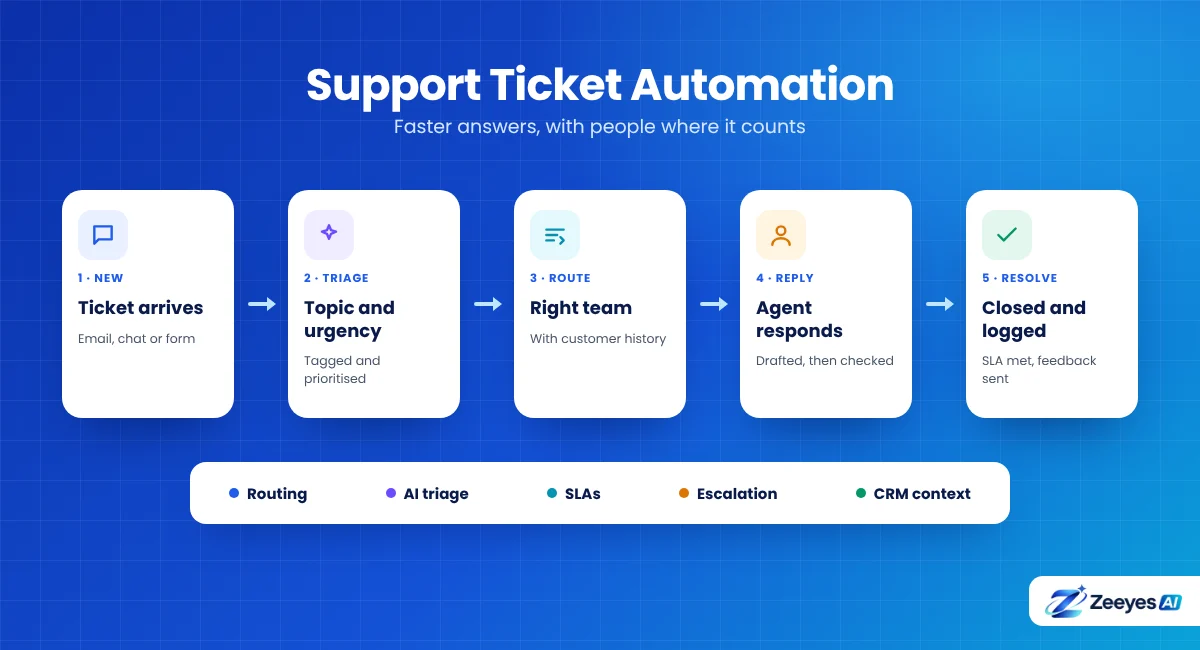
Short answer: Support ticket automation uses rules and AI to create, tag, prioritise and route customer tickets, suggest replies, track response times and close resolved cases. Simple, repeat questions can be answered automatically, while anything sensitive, such as refunds, complaints or account problems, goes to a person with the customer’s history already attached.
Key takeaways
- Automate the sorting first; it saves time without changing what customers see.
- Rules handle clear signals well. Add AI only where tickets need to be read to be understood.
- Let AI draft replies before you let it send them.
- Customers should always have an easy way to reach a person.
What is support ticket automation?
A support ticket is any customer request your team needs to track, whether it arrives by email, chat, web form or social message. On a quiet day, an agent can read each one, decide who should handle it and reply. On a busy day, the queue grows, urgent issues wait behind simple questions and nobody is sure which tickets are close to their deadline.
Support ticket automation takes over the repetitive handling around each request. Tickets are created and tagged automatically, sent to the right person, given a deadline and followed up if they stall. Done well, customers get faster and more consistent answers, and agents get more time for the conversations that need a human.
What to automate and what to keep human
| Good to automate | Keep with a person |
|---|---|
| Creating tickets from every channel | Complaints and unhappy customers |
| Tagging by topic, product and language | Refunds and billing disputes above a set amount |
| Routing to the right team or agent | Account access and security issues |
| Order status and other simple lookups | Anything legal, medical or safety related |
| Reminders, follow-ups and satisfaction surveys | Long-standing or high-value customers with a problem |
| Drafting replies from help articles | Final approval of non-routine replies |
8 ticket automation rules you can use today
Most help desks, such as Zoho Desk, Freshdesk or Zendesk, support rules like these without any custom code. They are a good place to start before adding AI.
| When this happens | Do this |
|---|---|
| Ticket arrives from the billing form | Assign to the Billing team, set priority Normal |
| Message mentions “refund”, “charged twice” or “cancel” | Tag Billing, raise priority to High |
| Customer is on a premium plan | Move to the priority queue, shorten the SLA |
| Ticket written in Spanish | Route to a Spanish-speaking agent or add a translation |
| No agent reply within 80% of the SLA | Notify the assignee and team lead |
| Waiting on customer for 5 days | Send a reminder; close after a further 3 days with a reopen link |
| Same customer opens 3 tickets in a week | Flag to a senior agent to check for a bigger issue |
| Ticket marked solved | Send a one-question satisfaction survey |
How to automate support ticket routing and triage with AI
Rules work well when the signal is clear, like a form field or a customer plan. They struggle with free text: a customer who writes “I still can’t get in after the update” may have a login, billing or bug problem. That is where AI triage helps.
- Define your categories. Keep the list short and clear, such as Billing, Orders, Technical, Account and Feedback. Too many categories confuse people and AI alike.
- Collect examples. Pull a sample of past tickets for each category so you can test how well the AI sorts them.
- Let AI read each new ticket. It returns the topic, urgency, sentiment and language.
- Add a confidence check. If the AI is unsure, the ticket goes to a general queue for a person to sort, rather than to a guessed team.
- Route with rules. The AI’s output feeds normal routing rules, so you can still see and adjust why a ticket went where it did.
- Review weekly. Check tickets that agents moved to another team. Each one shows where the categories or instructions need fixing.
Auto-replies, AI drafts and chatbots: which to use
| Auto-reply | AI-drafted reply | AI chatbot | |
|---|---|---|---|
| What it does | Sends a fixed message | Writes a reply for an agent to check | Answers the customer directly in chat |
| Best for | Confirming receipt, sharing expected wait times | Most day-to-day tickets | Simple, frequent questions outside office hours |
| Risk | Low | Low, as a person approves | Wrong or made-up answers if help content is thin |
| Must have | Clear, honest wording | Links to the source article | A visible way to reach a person |
Handing off from a chatbot to a person
A good handoff means the customer never has to repeat themselves. Pass the full chat history, the detected topic and any order or account details to the agent. Tell the customer honestly how long they may wait. In the EU, Article 50 of the AI Act requires that people are informed when they are talking to an AI system, and being upfront about it is good practice everywhere.
Our AI chatbots and customer support automation work is built around this handoff, so the bot answers what it can and passes the rest on cleanly.
SLA and escalation automation
A service level agreement, or SLA, is your promise on how quickly you respond and resolve. Automation keeps that promise visible:
- Set first-response and resolution targets for each priority level.
- Send a reminder to the assigned agent before a target is missed, not after.
- If the ticket is still open, reassign it or alert the team lead.
- Pause the timer while you are waiting for the customer to reply.
- Review breached tickets each week to find the cause, such as staffing, a missing article or a product bug.
Give agents customer context from your CRM
Many tickets take longer than they should because the agent has to look up the customer in two or three other systems. Connecting your help desk to your CRM, store and billing tools puts the order history, plan, open invoices and past tickets next to the conversation. “Where is my order?” tickets can even be answered automatically with live tracking details, which we cover in our guide to e-commerce order processing automation.
If your help desk and CRM do not connect out of the box, the link is usually built through their APIs. Our guide to API workflow automation explains how that works and how to handle errors safely.
Get your help content ready first
AI replies and chatbots are only as good as the information behind them. Before you switch them on:
- Find your 20 most common questions and check each has a clear, current help article.
- Remove or update outdated articles, since AI will happily repeat old information.
- Write policies, such as returns or cancellations, in plain language with exact conditions.
- Add a short internal note for each topic on when to escalate.
Mistakes that hurt customer trust
- Hiding the human option. A chatbot that will not let customers reach a person turns a small problem into a complaint.
- Closing tickets too quickly. Auto-closing after a short silence makes response numbers look good and customers feel ignored.
- Reply loops. Two automations replying to each other, or to an out-of-office message, can flood a customer’s inbox. Add rules to stop this.
- Over-confident AI answers. If the AI cannot find an answer in your content, it should say so and pass the ticket on.
- Automating before fixing the cause. If one product issue creates hundreds of tickets, fixing the issue beats answering faster.
What to measure
- First response time: how long customers wait for a real first reply.
- Time to resolution: from ticket created to solved.
- Reopen rate: a rise often means tickets are being closed or answered too quickly.
- Escalation rate: how often automation hands off to a person, and whether those handoffs were needed.
- Customer satisfaction: a short survey after each solved ticket.
Be careful with “deflection” numbers. A customer who leaves the chatbot without an answer counts as deflected but is not helped.
Frequently asked questions
What is support ticket automation?
Support ticket automation uses rules and AI to handle the routine work around customer requests: creating tickets from emails and chats, tagging them by topic and urgency, sending them to the right team, suggesting replies, tracking response times and closing resolved tickets. Agents spend their time answering customers instead of sorting the queue.
How do I automate support ticket routing?
Start with rules based on clear signals, such as the form the customer used, the product, the customer's plan or keywords in the subject. Add AI to read the message and detect topic, urgency and language when rules are not enough. Always have a default queue for tickets that match nothing.
Should AI reply to customers automatically?
Only for simple, low-risk questions with a clear answer in your help content, such as opening hours or how to reset a password. For everything else, let AI draft the reply and have an agent check and send it. Customers should always be able to reach a person.
What is AI ticket triage?
AI ticket triage means using a language model to read each new ticket and decide its topic, urgency, sentiment and language. The result is used to tag, prioritise and route the ticket. A confidence check sends unclear tickets to a person rather than guessing.
How do I set up SLA escalation?
Define a first-response and resolution target for each priority level. Set reminders before a target is missed, then reassign or alert a team lead if the ticket is still open. Pause the timer while you are waiting on the customer so the numbers stay fair.
Which support metrics should I track after automating?
Track first response time, time to resolution, reopen rate, escalation rate and customer satisfaction. Watch reopen rate closely: if it rises after automation, tickets are being closed or answered too quickly.
Final thoughts
The best support automation is the kind customers barely notice. Their question reaches the right person quickly, the answer is accurate, and they never have to explain the problem twice. Start by automating the sorting and follow-ups, get your help content in order, then bring in AI one step at a time, always with a clear path to a person.